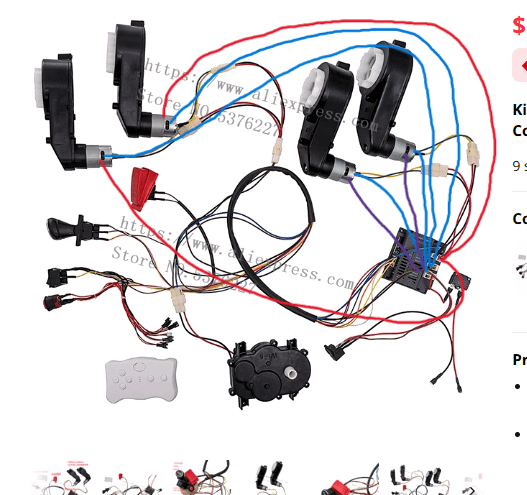
Are you ready to bring your Power Wheels ride back to life or upgrade it for better performance? Understanding the 12V wiring Power Wheels wiring diagram is the key to making sure your little one’s favorite toy runs smoothly and safely.
Whether you’re fixing a broken connection or customizing the electrical system, this guide will walk you through every step in a simple, clear way. Keep reading, and you’ll gain the confidence to handle your Power Wheels wiring like a pro—no confusion, no guesswork, just straightforward help that saves you time and frustration.
Power Wheels Basics
Power Wheels are small electric ride-on toys for kids. They run on batteries and use simple wiring systems.
Understanding the wiring helps keep the toy safe and working well. It also helps when fixing or upgrading the ride.
12v Battery Overview
The 12V battery powers the motor and other parts in Power Wheels. It stores electrical energy to make the toy move.
These batteries are rechargeable and come in sealed cases for safety. Proper care can make them last longer.
- Usually lead-acid or lithium-ion type
- Provides 12 volts of power
- Connects to the motor and controller
- Must be charged with the right charger
Key Components
Power Wheels have several parts that work together to make the toy move. Each part connects with wires to form a circuit.
- Battery:Supplies electric power
- Motor:Drives the wheels
- Switch:Turns power on or off
- Controller:Regulates speed and direction
- Wiring:Connects all electrical parts
Common Wiring Terms
Knowing wiring words helps you understand diagrams and fixes. These terms describe how parts connect and work.
- Positive (+):Wire that carries current from the battery
- Negative (-):Wire that returns current back to battery
- Ground:Common return path for electric current
- Connector:Joins wires or parts together
- Fuse:Safety device that stops power if there is a short
Credit: www.diyelectriccar.com
Tools And Materials Needed
Working on a 12V Power Wheels wiring project needs the right tools and materials. Having these ready makes the job easier and safer.
Below are the key items you should gather before starting your wiring work on Power Wheels.
Essential Tools
These tools help you cut, strip, and connect wires accurately and safely.
- Wire strippers for removing insulation
- Crimping tool for secure wire connections
- Multimeter to test voltage and continuity
- Screwdrivers (flathead and Phillips)
- Electrical tape for insulation
- Heat gun for heat shrink tubing
Wiring Supplies
Using the correct wiring supplies ensures your Power Wheels runs properly and safely.
| Item | Description |
|---|---|
| 12V Battery | Power source for the vehicle |
| Wires (12 or 14 gauge) | For connecting battery, motor, and switches |
| Connectors | Butt connectors and spade terminals for secure joins |
| Switch | On/off control for the Power Wheels |
| Fuse | Protects circuit from overload |
| Heat shrink tubing | Insulates wire connections |
Safety Gear
Wear safety gear to protect yourself from sparks and sharp tools.
- Safety glasses to shield your eyes
- Insulated gloves to prevent electric shock
- Long sleeves to protect skin from burns
- Work area with good lighting and ventilation
Reading The Wiring Diagram
Understanding a 12V Power Wheels wiring diagram helps you fix or build circuits. It shows how wires and parts connect.
Reading diagrams is easier when you know the symbols and colors. Tracing circuits helps find problems fast.
Diagram Symbols
Symbols represent parts like batteries, switches, and motors. They keep diagrams clear and simple.
- Battery: Shows where power starts
- Switch: Controls turning power on or off
- Motor: Drives the wheels
- Ground: Connects to the vehicle frame
- Connector: Joins wires together
Wire Color Codes
Wire colors tell you what each wire does. This helps avoid mistakes when connecting parts.
| Color | Meaning |
|---|---|
| Red | Positive power supply |
| Black | Ground or negative connection |
| Yellow | Switch or control wire |
| Green | Motor wire or signal |
Tracing Circuits
Follow wires from the battery to parts to check the circuit. Look for breaks or wrong connections.
- Start at the battery’s positive terminal
- Follow each wire to switches and motors
- Check wire colors match the diagram
- Look for loose or damaged wires
- Make sure ground wires connect properly
Step-by-step Wiring Process
Wiring a 12V Power Wheels toy requires careful steps to ensure safety and proper function. Follow this guide to connect the battery, switch, motor, and charger port correctly.
This step-by-step process helps you build a reliable power system for your Power Wheels toy.
Preparing The Battery
Start by selecting a 12V rechargeable battery. Check that the battery terminals are clean and free from corrosion.
Secure the battery in a holder or compartment to keep it stable during use.
- Use a 12V sealed lead-acid or lithium battery
- Clean battery terminals with a dry cloth
- Fix the battery firmly to avoid movement
- Ensure the battery has proper voltage and capacity
Connecting The Switch
Identify the switch terminals: input (power from battery) and output (power to motor). Connect the positive battery wire to the switch input terminal.
Then connect the switch output terminal to the motor’s positive wire. This allows the switch to control power flow.
- Use insulated wires for all connections
- Connect battery positive (+) to switch input
- Connect switch output to motor positive (+)
- Leave battery negative (-) and motor negative (-) connected directly
Wiring The Motor
Find the motor wires, usually two: positive and negative. Connect the motor negative wire directly to the battery negative terminal.
The motor positive wire connects to the switch output terminal, as mentioned earlier. Check all connections to avoid loose wires.
- Motor negative wire to battery negative terminal
- Motor positive wire to switch output terminal
- Secure all wire connections with electrical tape or connectors
- Test the motor by turning the switch on briefly
Installing The Charger Port
Choose a charger port compatible with your 12V battery. Connect the charger port positive wire to the battery positive terminal.
Connect the charger port negative wire to the battery negative terminal. Place the charger port where it is easy to access for charging.
- Use a 12V charger port matching your battery type
- Connect charger positive to battery positive terminal
- Connect charger negative to battery negative terminal
- Mount the charger port securely on the toy
Common Wiring Issues
Power Wheels use a 12V wiring system to run smoothly. Problems in wiring can stop the toy from working right. Knowing common wiring issues helps fix them faster.
Loose wires, shorts, and battery problems are common. These issues affect the toy’s power and safety. Checking wiring regularly keeps Power Wheels running well.
Loose Connections
Loose connections happen when wires are not tight. They can cause the Power Wheels to stop or work weakly. Vibration from riding can loosen wires over time.
Check all wire ends and connectors. Make sure they are secure and not corroded. Tighten any loose parts carefully to avoid damage.
- Inspect battery terminals for tight fit
- Secure wire connectors with pliers if needed
- Look for broken or frayed wires
Short Circuits
A short circuit happens when wires touch that should not. This can cause sparks or stop the toy from working. Shorts can damage the battery and wiring.
Look for bare wires or melted insulation. Keep wires neat and separated. Use electrical tape to cover exposed parts and avoid shorts.
- Check for damaged wire insulation
- Separate wires to prevent contact
- Use tape or shrink tubing on exposed wires
Battery Drain Problems
Battery drain happens when power leaks from the system. This makes the battery run out quickly. It can be caused by wiring faults or leaving the toy on too long.
Check wiring for constant power draw. Make sure the switch turns off all power. Remove the battery when not in use for a long time.
- Test for power drain with a multimeter
- Ensure the on/off switch fully cuts power
- Disconnect battery if toy is unused
Upgrading Your Power Wheels
Upgrading your Power Wheels can make them more fun and functional. You can add features like LED lights, a horn, and better speed control.
These improvements can enhance your child's driving experience, making it safer and more exciting.
Adding Led Lights
Installing LED lights on your Power Wheels is an easy upgrade. It makes the vehicle look cool and improves visibility at night.
- Choose LED lights that are battery efficient.
- Secure the lights to the front and rear of the vehicle.
- Connect the lights to the 12V battery system safely.
Installing A Horn
A horn can alert others when your child is driving. It is a simple upgrade that adds an element of safety.
Improving Speed Control
Improving speed control allows for better management of the vehicle. This upgrade can ensure a smoother and safer ride.
| Speed Setting | Description |
| Low | Best for beginners |
| Medium | Good for moderate skills |
| High | For experienced drivers |
Maintenance Tips
Keeping your 12V Power Wheels in good shape requires regular maintenance. Follow these tips to ensure safe and efficient operation.
Proper care extends the life of the vehicle and ensures safety for your kids. These maintenance steps are simple and effective.
Regular Inspection
Inspect your Power Wheels regularly to catch any issues early. A quick check can prevent bigger problems.
- Check all wiring for signs of wear or damage.
- Ensure the wheels are securely attached and not wobbling.
- Test the brakes to make sure they engage properly.
Cleaning Connections
Connections can get dirty and affect performance. Regular cleaning keeps them in top condition.
- Disconnect the battery before cleaning.
- Use a damp cloth to wipe connectors.
- Apply a small amount of dielectric grease to prevent corrosion.
Battery Care
The battery is the heart of your Power Wheels. Taking care of it ensures long-lasting fun.
| Task | Frequency |
| Charge battery | After every use |
| Check voltage | Monthly |
| Replace if necessary | Every 1-2 years |
Credit: www.supraforums.com

Credit: www.amazon.ca
Frequently Asked Questions
What Is A 12v Power Wheels Wiring Diagram?
A 12V Power Wheels wiring diagram shows the electrical connections. It helps in understanding how to connect batteries, motors, and switches properly. This diagram is essential for safe assembly and troubleshooting of Power Wheels vehicles.
How Do I Wire A 12v Power Wheels Battery?
To wire a 12V Power Wheels battery, connect the positive terminal to the motor’s positive lead. Then, connect the negative terminal to the motor’s negative lead. Ensure all connections are secure and insulated to prevent short circuits.
Can I Upgrade A Power Wheels To 12v Wiring?
Yes, upgrading to 12V wiring improves power and speed. Use a compatible 12V battery, motor, and wiring harness. Follow a proper wiring diagram to avoid damage and ensure safety.
What Tools Are Needed For 12v Power Wheels Wiring?
You’ll need wire strippers, electrical tape, screwdrivers, and a multimeter. These tools help strip wires, secure connections, and test voltage for safe wiring.
Conclusion
Wiring a 12V Power Wheels can be simple and safe. Follow the diagram step by step to avoid mistakes. Check all connections before powering on the vehicle. Use the right tools and parts for best results. Proper wiring keeps your Power Wheels running smoothly and safely.
Take your time and double-check your work. Enjoy a fun and safe ride every time.