Imagine unlocking your door with just a simple touch or a quick tap on your phone, no keys needed. The Yale Assure Lock SL Wi-Fi Touchscreen Smart Lock offers exactly that — a seamless way to secure your home while making your life easier.
If you’re looking for a smart lock that combines style, convenience, and top-notch security, this might be the perfect fit for you. Keep reading to discover how this innovative lock can change the way you protect your home every day.
Features Of Yale Assure Lock Sl
The Yale Assure Lock SL is a smart lock designed for easy home security. It offers modern features for simple, key-free access.
This lock combines style and technology to keep your home safe and convenient to enter.
Sleek Key-free Design
The Yale Assure Lock SL has a slim, modern look without a traditional keyhole. This design adds extra security.
You can lock and unlock the door without using keys. This makes it easier to enter your home quickly.
Touchscreen Interface
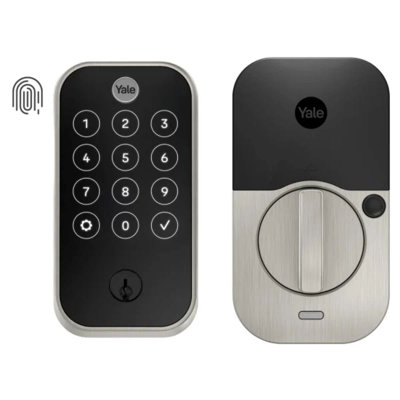
The lock features a touchscreen keypad for entering codes. The screen is easy to use and clean.
You can create and change access codes for family and guests. The touchscreen works well in all light conditions.
Wi-fi Connectivity
This smart lock connects to your home Wi-Fi network. It lets you control the lock remotely using your phone.
You can check lock status and manage access from anywhere. The Wi-Fi connection adds convenience and control.
Built-in Alarm System
The lock has a built-in alarm to warn about break-in attempts. It sounds if someone tries to force the door.
This alarm adds an extra layer of protection for your home and family.
Installation Process
Installing the Yale Assure Lock SL Wi-Fi Touchscreen Smart Lock is straightforward. You can set it up yourself with some basic tools and clear instructions.
This guide will help you through the installation steps and explain what tools you need. It also covers which doors are compatible with this lock.
Tools Required
You need a few simple tools to install the Yale Assure Lock SL. Having these ready will make the process easier and faster.
- Phillips screwdriver
- Flathead screwdriver
- Measuring tape
- Pencil or marker
- Drill with drill bits (only if new holes are needed)
- Batteries (usually included with the lock)
Step-by-step Setup
Follow these steps to install your Yale Assure Lock SL. Each step is simple and clear to help you install the lock correctly.
- Remove the old lock from your door.
- Check if the door holes fit the new lock.
- Attach the new lock exterior keypad on the outside of the door.
- Install the interior assembly on the inside of the door.
- Secure both parts with screws using a screwdriver.
- Insert batteries into the lock’s battery compartment.
- Test the touchscreen and lock functions.
- Connect the lock to your Wi-Fi network following the app instructions.
Compatibility With Doors
The Yale Assure Lock SL works with many standard doors. Check your door before buying or installing this lock.
- Fits doors 1-3/8 inches to 2 inches thick
- Works with standard door preparations (1-inch diameter hole for lock, 2-1/8-inch diameter hole for latch)
- Compatible with doors that swing left or right
- Suitable for both wood and metal doors
- Not designed for doors with very unusual shapes or thickness
Smart Home Integration
The Yale Assure Lock SL Wi-Fi Touchscreen Smart Lock fits well in smart homes. It connects with many devices for easy control.
This smart lock adds security and convenience to your home automation system. You can manage your lock from anywhere.
Works With Alexa And Google Assistant
You can control the Yale Assure Lock SL using Alexa or Google Assistant. Voice commands let you lock or check the door status.
This hands-free feature helps when your hands are full or you want quick access. It also works with routines for automation.
Integration With Smart Hubs
The lock connects to smart hubs like Samsung SmartThings. This lets you link it with other smart home devices.
Using a hub, you can create actions like locking the door when you leave or turning off lights when you lock up.
- Connect with smart lights
- Use smart sensors for triggers
- Monitor devices in one app
Remote Access And Control
The Yale Assure Lock SL offers remote access through its app. You can lock or unlock the door from anywhere.
The app also sends alerts when the door is used. This helps you keep track of who enters your home.
- Lock/unlock remotely
- Receive notifications
- Manage access codes

Credit: www.lowes.com
Security Features
The Yale Assure Lock SL Wi-Fi Touchscreen Smart Lock offers strong security for your home. It uses modern technology to keep your door safe from intruders.
This smart lock combines convenience with safety. It gives you control over who enters your home and alerts you if there is any suspicious activity.
Advanced Encryption
The lock uses advanced encryption to protect your data. This stops hackers from intercepting your codes and information.
It uses strong wireless security standards to keep your lock’s connection safe. This helps prevent unauthorized access to your home.
Auto-lock And Unlock
The smart lock can lock your door automatically after it closes. This ensures your home stays secure even if you forget to lock the door.
It can also detect your phone nearby to unlock the door. This feature allows easy entry without using keys or codes.
- Auto-lock activates after a set time
- Phone proximity triggers auto-unlock
- Adjustable settings for personal use
Tamper Alerts
The lock sends alerts if someone tries to tamper with it. This helps you respond quickly to possible break-in attempts.
You get notifications on your phone when the lock detects forced entry or unusual behavior. This feature keeps you informed about your home's security.
User Experience
The Yale Assure Lock SL Wi-Fi Touchscreen Smart Lock offers a smooth user experience. It blends security with easy access for daily use.
This smart lock fits well into modern homes by providing simple control and management.
Ease Of Use
The touchscreen is clear and easy to read. Users can quickly enter codes without confusion.
Installation is straightforward and fits standard doors. The lock works silently and smoothly.
- Bright touchscreen for easy code entry
- Silent locking and unlocking
- Fits most standard door sizes
- Simple installation with clear instructions
Mobile App Functionality
The mobile app lets users control the lock from anywhere. It connects over Wi-Fi for instant updates.
Users can lock, unlock, and check the lock status using the app. Notifications keep users informed about access activity.
- Lock and unlock remotely
- Receive access notifications instantly
- View lock status anytime
- Manage settings with simple controls
User Code Management
The lock supports multiple user codes for family and guests. Codes can be added or deleted easily through the app.
Temporary codes help limit access for short times. The system tracks all code uses for security.
- Add or remove user codes quickly
- Create temporary codes with set time limits
- Track who used codes and when
- Manage codes without needing the lock physically
Credit: www.wayfair.ca
Battery Life And Maintenance
The Yale Assure Lock SL Wi-Fi Touchscreen Smart Lock uses batteries to operate. Good battery life keeps the lock working smoothly.
Proper maintenance helps the lock last longer and stay reliable over time.
Battery Replacement Tips
Replace the batteries when the lock shows a low battery warning. Use four AA alkaline batteries for best results.
Remove old batteries carefully to avoid corrosion. Insert new batteries with correct polarity.
- Check battery level often to avoid sudden power loss
- Use high-quality alkaline batteries only
- Replace all batteries at the same time
- Dispose of used batteries safely
Power Backup Options
The lock has a 9V battery backup terminal. It helps if the main batteries die unexpectedly.
Connect a 9V battery to the backup terminals on the lock’s bottom. This powers the lock temporarily for emergency access.
- Keep a 9V battery handy for emergencies
- Use the 9V battery only during main battery failure
- Replace the 9V battery after use
Maintenance Guidelines
Clean the lock’s touchscreen and exterior with a soft cloth. Avoid harsh chemicals or water inside the lock.
Check screws and parts regularly. Tighten any loose parts to keep the lock secure and working well.
- Wipe the touchscreen gently to remove dirt
- Do not spray liquids directly on the lock
- Inspect the lock every few months
- Keep firmware updated for best performance
Pros And Cons
The Yale Assure Lock SL Wi-Fi Touchscreen Smart Lock is a modern home security device. It offers keyless entry and remote control through Wi-Fi.
This smart lock fits well on most standard doors. It brings convenience but also has some drawbacks to consider.
Advantages
The lock has a sleek touchscreen that lets you enter codes without keys. It connects to Wi-Fi for remote access.
- Easy to install on standard doors
- Allows keyless entry with passcodes
- Remote lock and unlock using smartphone
- Works with smart home systems like Alexa
- Battery lasts several months on normal use
- Auto-lock feature for added security
- Multiple user codes can be set up
Limitations
The lock depends on Wi-Fi, so internet issues can affect its use. It has no key backup option.
- No physical key backup for emergencies
- Touchscreen can be less responsive in cold weather
- Requires frequent battery checks to avoid lockout
- Setup can be tricky for some users
- Wi-Fi signal strength affects remote features
- Higher price compared to traditional locks
Comparisons With Other Smart Locks
The Yale Assure Lock SL Wi-Fi Touchscreen Smart Lock is a popular choice for home security. It offers smart features and easy access.
This lock competes with many other smart locks on the market. We will compare its price, features, performance, and customer reviews.
Price And Features
The Yale Assure Lock SL is priced in the mid-range for smart locks. It includes Wi-Fi connectivity and a touchscreen keypad.
Other locks may have different features like fingerprint access or physical keys. Yale focuses on a key-free design.
- Price: Moderate compared to premium models
- Features: Wi-Fi, touchscreen, app control
- No physical key needed
- Works with smart home systems like Alexa and Google
Performance
The lock responds quickly to commands from the app and keypad. It has reliable Wi-Fi connection and battery life.
Some other locks may offer faster setup or multi-user management. Yale is solid for everyday use without delays.
- Fast response to unlock and lock
- Strong Wi-Fi connection
- Battery lasts several months
- Good security with tamper alarms
Customer Reviews
Customers like the Yale Assure Lock SL for its design and ease of use. Many mention the smooth touchscreen and app control.
Some users note occasional Wi-Fi drops but say support helps quickly. Overall, reviews are mostly positive with minor complaints.
- Positive: Easy installation and setup
- Positive: Sleek, modern look
- Negative: Some Wi-Fi connection issues
- Negative: Higher price than basic locks

Credit: www.amazon.com
Frequently Asked Questions
What Features Does The Yale Assure Lock Sl Offer?
The Yale Assure Lock SL offers a sleek touchscreen keypad, Wi-Fi connectivity, and smart home integration. It allows remote access and control through a smartphone app. It also features automatic locking, voice assistant compatibility, and customizable entry codes. This ensures security and convenience for your home.
How Does Yale Assure Lock Sl Connect To Wi-fi?
The Yale Assure Lock SL connects to Wi-Fi using the Yale Access module. This module integrates the lock with the Yale Access app. Once connected, users can control the lock remotely. It also enables integration with smart home systems and voice assistants.
Can I Use Yale Assure Lock Sl With Smart Home Devices?
Yes, the Yale Assure Lock SL is compatible with various smart home systems. It works with Amazon Alexa, Google Assistant, and Apple HomeKit. This allows users to control the lock using voice commands. Integration enhances convenience and security for smart home enthusiasts.
How Do I Install The Yale Assure Lock Sl?
Installing the Yale Assure Lock SL is straightforward and suitable for DIY enthusiasts. It requires replacing your existing deadbolt with the lock. The package includes all necessary components and instructions. The process typically takes about 30 minutes. No additional wiring is required.
Conclusion
The Yale Assure Lock SL Wi-Fi Touchscreen Smart Lock offers easy home security. It fits well on most doors and connects to your phone. You can lock and unlock without keys. The touchscreen is simple to use, even in the dark.
It sends alerts if someone tries to enter. Battery life lasts long, so you won’t worry about power. This smart lock blends safety with convenience. A good choice for anyone wanting better control over home access. Simple, smart, and reliable.