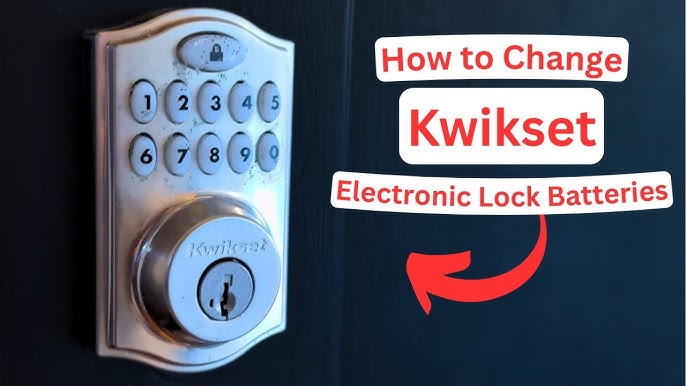
Is your Kwikset smart lock acting sluggish or refusing to respond? If so, it might be time to change the battery.
You rely on your smart lock every day to keep your home safe and secure, so a dead battery can cause frustration and worry. But don’t worry—replacing the battery is easier than you think. In this guide, you’ll learn simple steps to quickly swap out your Kwikset smart lock battery and get it working like new.
Keep reading to avoid lockouts and keep your home protected without any hassle.
Signs Your Kwikset Lock Needs New Batteries
Your Kwikset smart lock runs on batteries that power its electronic features. Knowing when to change them keeps your lock working smoothly.
This guide helps you spot signs that the battery is low and needs replacement soon.
Low Battery Alerts
Kwikset locks give clear alerts to warn you about low battery power. These alerts help avoid lockouts or malfunctions.
- The lock may flash a red light on the keypad.
- You might hear beeping sounds during use.
- Some models send notifications to your phone app.
- The lock’s LED indicator can turn yellow or red.
Lock Performance Issues
Low batteries can cause your lock to work slower or fail. Watch for these performance problems:
| Problem | What Happens |
|---|---|
| Delayed Response | The lock takes longer to open or close. |
| Incomplete Locking | The deadbolt may not fully extend. |
| Keypad Issues | Buttons may not respond or register presses. |
| Power Failures | The lock may shut down unexpectedly. |
Battery Life Expectations
Knowing how long your batteries last helps you plan replacements. Battery life varies based on lock use and battery type.
- Standard alkaline batteries usually last 6 to 12 months.
- Heavy use can shorten battery life to 3 to 6 months.
- Use high-quality batteries for longer performance.
- Always keep spare batteries nearby for quick changes.

Credit: www.youtube.com
Tools Required For Battery Replacement
Changing the battery in your Kwikset smart lock is simple. Having the right tools ready makes the job faster.
This guide covers the batteries you need and the basic tools to carry out the replacement safely.
Recommended Batteries
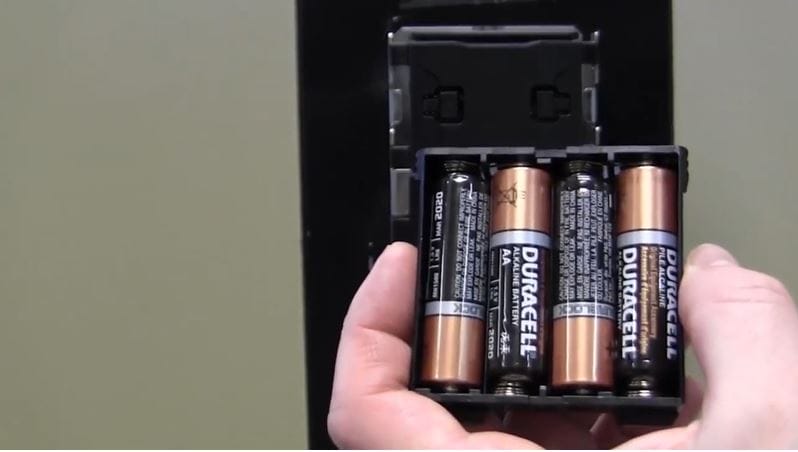
Kwikset smart locks typically use AA alkaline batteries. Using quality batteries ensures longer lock operation.
- Alkaline AA batteries (1.5V)
- Brand examples: Duracell, Energizer, Panasonic
- Avoid rechargeable or low-quality batteries
- Replace all batteries at the same time for best results
Basic Tools Needed
You only need a few tools to replace the batteries in your Kwikset smart lock. These tools help you open the lock cover and install new batteries.
| Tool | Purpose |
| Phillips-head screwdriver | Remove screws on the lock cover |
| Flat-head screwdriver | Help pry open the battery compartment |
| Clean cloth | Wipe the battery contacts and lock surface |
| New AA batteries | Power the smart lock |
Preparing To Change The Batteries
Changing the batteries in your Kwikset smart lock keeps it working well. It is important to get ready before you start.
This guide helps you find the battery compartment and follow safety steps. Read carefully to avoid problems.
Locate The Battery Compartment
The battery compartment is usually on the inside part of the lock. You may need to remove the lock cover to see it.
Look for a small panel or door that can slide or lift open. This panel holds the batteries that power the lock.
- Check the back of the lock on the inside door
- Look for a plastic or metal cover
- Use a screwdriver if needed to open the cover
- Be gentle to avoid breaking the cover
Safety Precautions
Safety is important when changing batteries. Follow simple rules to keep safe and protect your lock.
Always handle batteries carefully. Avoid mixing old and new batteries or using damaged ones.
- Turn off the lock if possible before opening the battery compartment
- Use the correct battery type as stated in the manual
- Do not force the battery cover open
- Keep batteries away from children and pets
- Dispose of old batteries properly to avoid harm
Step-by-step Battery Replacement
Changing the battery in your Kwikset smart lock is simple. It helps keep your lock working well.
This guide shows easy steps to replace the battery safely and quickly.
Removing The Battery Cover
First, find the battery cover on the back of the lock. It usually slides or snaps off.
Use your fingers or a small flat tool to gently open the cover. Avoid using too much force.
Taking Out Old Batteries
Look inside the battery compartment. You will see the old batteries that need to be removed.
Carefully lift or slide out the old batteries. Dispose of them according to local rules.
Inserting New Batteries
Check the battery type needed. Most Kwikset locks use AA or 9-volt batteries.
- Insert new batteries with the correct positive (+) and negative (-) ends.
- Make sure the batteries fit snugly in the compartment.
Do not mix old and new batteries or different brands.
Securing The Battery Cover
Place the battery cover back over the compartment. Align it with the lock body.
Press or slide the cover until it clicks or feels secure. Check that it does not move.
Testing Your Kwikset Smart Lock After Replacement
After changing the battery in your Kwikset Smart Lock, it is important to test its functionality. This ensures your lock works properly and keeps your home secure.
Follow these steps to check if your lock operates smoothly and address any issues that may arise. This guide will help you ensure everything is set correctly.
Checking Lock Functionality
Begin by testing if the lock opens and closes without trouble. Use the keypad or your app to see if the lock responds correctly.
Listen for any unusual sounds when the lock operates. The lock should move smoothly and quietly.
- Enter your code to unlock the door
- Lock the door using the app
- Check the LED light for normal operation
Resetting The Lock If Needed
If the lock does not work properly, you may need to reset it. A reset can solve many common problems.
Follow the instructions in your lock's manual to perform a reset. This process usually involves pressing a reset button or using a specific code.
- Locate the reset button on the lock
- Press and hold the button for a few seconds
- Re-enter your codes and test the lock again
Tips To Extend Battery Life
Kwikset smart locks offer convenience and security. To keep them running, it's important to manage battery life effectively. Here are some tips to help extend the life of your smart lock's battery.
Regular maintenance and using quality batteries can make a big difference. Let's explore these strategies in more detail.
Regular Maintenance
Regular maintenance of your Kwikset smart lock can prevent battery drain. Make sure the lock is installed properly and aligned with the door frame. Misalignment can cause the motor to work harder, using more battery power.
Keep the lock and door clean. Dust and dirt can interfere with the lock's mechanics. Wipe the lock with a soft, dry cloth to keep it free from debris.
- Check the lock for proper alignment
- Clean the lock regularly
- Ensure the door closes smoothly
Using Quality Batteries
Using high-quality batteries can extend the life of your smart lock. Always use new, name-brand batteries. Avoid mixing old and new batteries as this can reduce overall performance.
Consider using lithium batteries for longer life. They perform better in extreme temperatures, which can be beneficial if your lock is exposed to harsh weather.
- Choose name-brand batteries
- Use all new batteries at once
- Consider lithium for extreme conditions
Troubleshooting Common Battery Issues
Kwikset smart locks use batteries to work properly. Sometimes, the lock may stop working or show errors. These problems often come from the battery.
Knowing how to fix battery issues helps keep your lock safe and working. This guide covers two common problems and how to solve them.
Lock Not Responding
If the lock does not respond when you try to open it, the battery may be dead or low. The lock needs enough power to send signals and work smoothly.
Try these steps to fix the problem:
- Remove the battery cover and check the batteries.
- Replace old batteries with new, fresh ones.
- Make sure the batteries are inserted the right way.
- Clean the battery contacts if they look dirty or rusty.
- Press the reset button on the lock if available.
Battery Drain Problems
Batteries may drain quickly if the lock uses too much power. This can happen from constant use or a technical issue inside the lock.
Here are tips to reduce battery drain:
- Use high-quality alkaline batteries for longer life.
- Check for firmware updates that improve battery use.
- Avoid leaving the lock open or unlocked for long times.
- Turn off features you don’t use, like auto-lock or alerts.
- Keep the lock clean and dry to prevent damage.

Credit: www.youtube.com
Credit: guardianprotection.com
Frequently Asked Questions
How Do I Change Batteries In A Kwikset Smart Lock?
To change batteries, remove the lock’s interior cover. Replace the old batteries with four fresh AA alkaline batteries. Ensure correct polarity. Then, reattach the cover securely and test the lock for proper operation.
What Type Of Batteries Does Kwikset Smart Lock Use?
Kwikset smart locks typically use four AA alkaline batteries. Avoid rechargeable or lithium batteries to prevent damage. Using the recommended batteries ensures optimal performance and longer battery life for your lock.
How Often Should I Replace Kwikset Smart Lock Batteries?
Replace batteries every 6 to 12 months for reliable performance. Battery life depends on lock usage and features like Wi-Fi connectivity. Low battery warnings will notify you to replace batteries promptly to avoid lockouts.
Can I Change Kwikset Smart Lock Batteries Without Removing The Lock?
No, you must remove the interior cover to access the battery compartment. This step is essential to safely replace batteries without damaging the lock’s electronics or housing.
Conclusion
Changing your Kwikset smart lock battery keeps your lock working well. Regular battery checks help avoid lockouts and other problems. The process is quick and easy to follow. Keep spare batteries handy for smooth operation. A well-maintained smart lock gives you peace of mind.
Simple steps ensure your home stays safe and secure. Don’t wait until the battery dies to act. Stay prepared and keep your lock powered up.