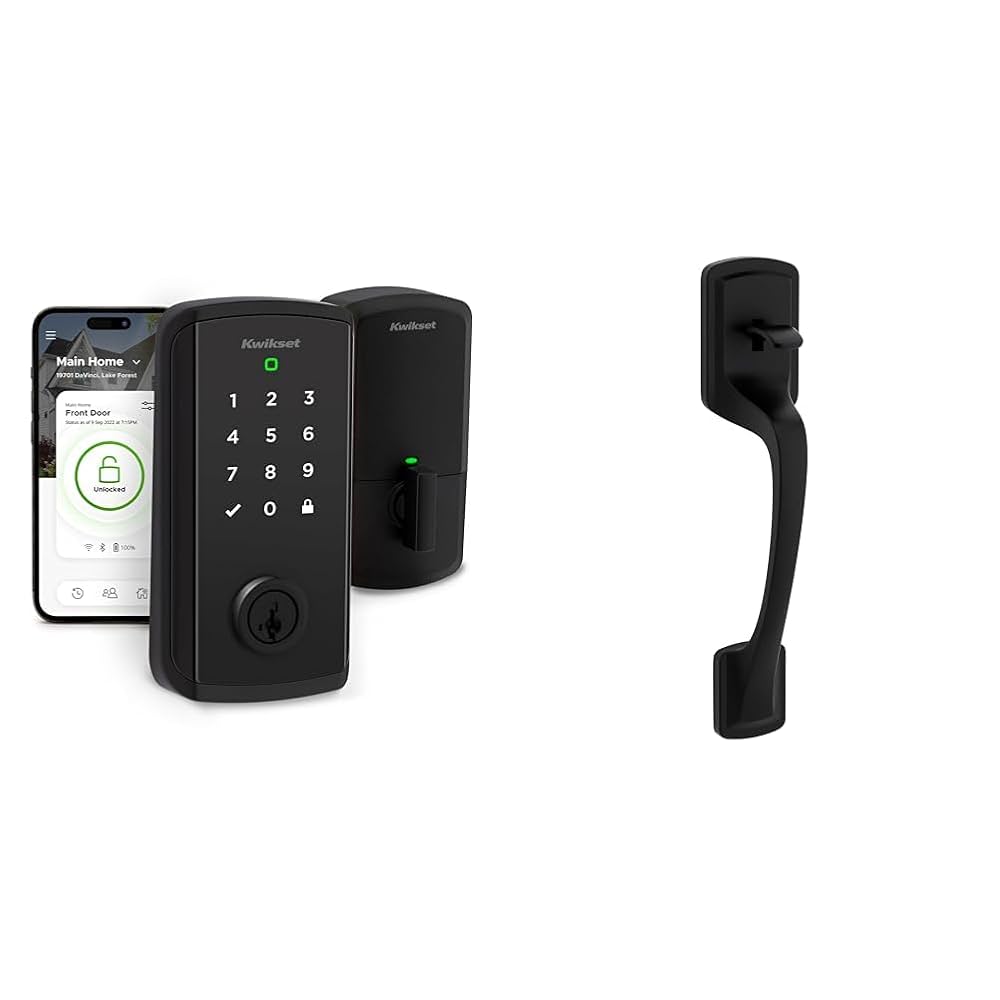
Imagine unlocking your door with just a simple touch or from anywhere using your phone. The Kwikset Halo Touchscreen Wifi Smart Lock with Contemporary Lever makes this possible, blending modern technology with sleek design.
If you want to boost your home’s security without sacrificing style or convenience, this smart lock could be exactly what you need. Keep reading to discover how this lock can simplify your life and keep your home safer than ever.
Kwikset Halo Features
The Kwikset Halo is a smart lock that adds safety and convenience to your home. It works with WiFi and has a modern look.
This smart lock helps you control access and keep track of who comes in and out of your door.
Touchscreen Design
The Kwikset Halo uses a touchscreen to enter codes. This design is easy to use and clean.
The screen lights up when you touch it, making it simple to see even at night.
Contemporary Lever Style
This smart lock has a lever that fits modern home styles. It looks good on any door.
The lever is easy to push down, which helps people of all ages use it comfortably.
Wifi Connectivity
The Kwikset Halo connects to your home WiFi. You can control the lock from your phone.
- Lock or unlock remotely
- Get alerts when someone uses the lock
- Set up access codes for family and friends
Installation Process
The Kwikset Halo Touchscreen Wifi Smart Lock with Contemporary Lever is easy to install. It fits most standard doors. You can set it up yourself with a few tools and steps.
This guide will help you through the installation process. Follow each part carefully to get your smart lock working well.
Tools Required
You need some basic tools to install the Kwikset Halo lock. Having these ready will make the process smooth and fast.
- Phillips screwdriver
- Flathead screwdriver
- Measuring tape
- Drill with drill bits (if new holes are needed)
- Level tool
- Pencil for marking
Step-by-step Setup
Installing the smart lock involves removing the old lock and fitting the new one. Follow these steps carefully for a proper fit.
- Remove the existing door knob or lever and deadbolt.
- Check the door thickness; it should be between 1-3/8 to 1-3/4 inches.
- Install the new latch into the edge of the door and secure it with screws.
- Attach the exterior keypad and interior touchscreen components to the door.
- Connect the interior assembly by attaching it to the exterior part through the door.
- Secure the lock with screws and make sure it is level.
- Insert batteries into the interior unit to power the lock.
- Follow the lock’s touchscreen prompts to connect it to your Wi-Fi.
- Test the lock by locking and unlocking using the touchscreen and app.
Compatibility Tips
Ensure your door and Wi-Fi setup work well with the Kwikset Halo lock. This helps avoid installation issues and connection problems.
- Door thickness should be between 1-3/8" and 1-3/4".
- Backset distance must be either 2-3/8" or 2-3/4".
- Make sure the door swings inward or outward properly for lever orientation.
- Check that your Wi-Fi network is 2.4 GHz for best connectivity.
- A strong Wi-Fi signal near the door helps the lock work smoothly.
Security Benefits
The Kwikset Halo Touchscreen Wifi Smart Lock offers strong security features. It helps keep your home safe and secure.
This smart lock uses modern technology to protect your door. It gives you control over who can enter your home.
Advanced Encryption
The lock uses advanced encryption to protect data. It keeps your access codes and information safe from hackers.
Strong encryption means only authorized devices can communicate with the lock. This reduces the risk of unauthorized access.
User Access Control
You can create and manage user codes easily. This lets you give access only to trusted people.
The lock allows you to set schedules for each user. You control when someone can enter your home.
- Add or delete user codes anytime
- Set access for specific days and times
- Monitor who enters and leaves
Auto-lock And Alerts
The auto-lock feature secures your door automatically after closing. You don’t need to worry about forgetting to lock it.
Alerts notify you if someone tries to tamper with the lock or if the door is left open. This helps you act quickly.
- Auto-lock activates after door closes
- Real-time alerts sent to your phone
- Helps prevent forced entry and mistakes

Credit: www.ebay.com
Smart Home Integration
The Kwikset Halo Touchscreen Wifi Smart Lock works well with smart home systems. It adds security and convenience to your daily life.
This lock fits easily into your connected home setup. You can control it using different smart devices and apps.
Voice Assistant Compatibility
The Halo Smart Lock works with popular voice assistants. This makes locking and unlocking easy without using your hands.
You can ask your voice assistant to check the lock status or lock the door remotely. It supports:
- Amazon Alexa
- Google Assistant
- Apple HomeKit (via compatible hubs)
App Features
The Kwikset app gives you full control of the lock from your phone. You can set user codes and manage access easily.
Key app features include:
- Create and delete user codes
- View lock activity history
- Set auto-lock timing
- Receive notifications for lock events
Remote Access
Remote access lets you control the lock from anywhere. This adds safety and flexibility for your home.
You can lock or unlock the door even if you are not home. You can also check the lock status at any time.
User Experience
The Kwikset Halo Touchscreen Wifi Smart Lock offers a modern way to secure your home. It combines a sleek look with smart technology.
This smart lock focuses on making everyday use simple and reliable for all users.
Ease Of Use
The touchscreen is clear and responds quickly to touch. You can set up and manage access codes easily through the app.
The lever handle moves smoothly, making it easy to open the door. The lock works well for people of all ages.
- Simple code programming
- Responsive touchscreen
- Comfortable lever design
- Works with voice assistants
Battery Life
The lock uses four AA batteries that last about one year with normal use. The app alerts you when battery power is low.
You can still use the physical key if the batteries run out, which adds extra security.
- One-year average battery life
- Low battery notifications in app
- Physical key backup included
- Easy battery replacement
Troubleshooting
If the touchscreen stops working, try restarting the lock by removing and reinserting the batteries. This often fixes small glitches.
For connectivity issues, check your Wi-Fi network and make sure the lock is in range. Reset the lock if needed through the app.
- Restart lock by battery reset
- Check Wi-Fi signal strength
- Use app to reset the lock
- Contact support if problems persist

Credit: www.amazon.com
Comparison With Other Smart Locks
The Kwikset Halo Touchscreen Wifi Smart Lock with Contemporary Lever is one of many smart locks on the market. It offers features that differ from other popular models. This comparison helps you understand its strengths and weaknesses.
Smart locks vary in price, features, and user feedback. Looking at these points shows how the Kwikset Halo stands out or fits in with others.
Price Points
The Kwikset Halo is priced in the mid to high range. It is generally more expensive than basic smart locks but less than premium models with extra features.
Some cheaper locks lack Wi-Fi or touchscreen features. More expensive locks may add advanced sensors or fingerprint access.
- Kwikset Halo: Mid to high price range
- Basic smart locks: Lower price, fewer features
- Premium smart locks: Higher price, extra functions
Feature Differences
The Kwikset Halo has a touchscreen and Wi-Fi built-in. It also includes a contemporary lever design, which some users prefer over traditional knobs.
Other smart locks may offer voice assistant support, fingerprint sensors, or auto-locking features. The Halo focuses on easy Wi-Fi setup and strong security.
| Feature | Kwikset Halo | Other Smart Locks |
|---|---|---|
| Touchscreen | Yes | Varies |
| Wi-Fi | Built-in | Sometimes requires hub |
| Contemporary Lever | Yes | Usually knob |
| Fingerprint Sensor | No | Available on some |
| Voice Assistant | Compatible | Many support |
Customer Reviews
Many users appreciate the Kwikset Halo for its easy installation and reliable Wi-Fi connection. The touchscreen works well in daily use.
Some customers mention the price is higher than expected. A few also wish for more advanced features like fingerprint access.
- Positive: Easy setup, good Wi-Fi range
- Positive: Solid build and lever style
- Negative: Price above some competitors
- Negative: Lacks biometric options
Maintenance Tips
Keeping your Kwikset Halo Touchscreen Wifi Smart Lock in good shape helps it work well. Regular care avoids problems and extends its life.
Follow simple steps to maintain the lock’s screen, battery, and software. These tips keep your smart lock safe and reliable.
Cleaning The Touchscreen
Clean the touchscreen often to keep it clear and easy to use. Dirt and oils can make the screen less responsive.
Use a soft, dry cloth to wipe the screen gently. Avoid using water, sprays, or harsh cleaners. These can damage the screen.
Battery Replacement
Check the battery level regularly to avoid lockouts. The lock will warn you when the battery is low.
Use four AA alkaline batteries for replacement. Remove the battery cover and insert new batteries with the correct polarity.
- Open the battery cover on the interior side
- Remove old batteries carefully
- Insert new AA alkaline batteries
- Close the cover securely
Software Updates
Keep the smart lock’s software up to date. Updates fix bugs and add new features to improve security.
Connect the lock to your home Wi-Fi and check for updates in the Kwikset app. Install updates as soon as they are available.

Credit: www.amazon.sa
Frequently Asked Questions
What Features Does The Kwikset Halo Offer?
The Kwikset Halo Touchscreen Wifi Smart Lock includes a contemporary lever, remote access, and voice control. It allows you to lock and unlock your door from anywhere using your smartphone. The lock also supports up to 250 user codes and provides real-time notifications for enhanced security.
How Does The Kwikset Halo Connect To Wifi?
The Kwikset Halo connects directly to your home WiFi network without additional hardware. Simply use the Kwikset app for setup and management. This connectivity lets you control and monitor the lock from your smartphone, providing convenience and peace of mind.
Is The Kwikset Halo Compatible With Smart Home Systems?
Yes, the Kwikset Halo is compatible with several smart home systems. It works seamlessly with Amazon Alexa and Google Assistant. This integration allows you to use voice commands for locking and unlocking. Enhance your smart home experience with this modern convenience.
How Secure Is The Kwikset Halo Smart Lock?
The Kwikset Halo Smart Lock features advanced security measures, including encryption and secure boot technology. It provides real-time notifications for unauthorized access attempts. With customizable user codes and a tamper-resistant design, it offers robust security for your home.
Conclusion
The Kwikset Halo Touchscreen WiFi Smart Lock with Contemporary Lever offers great security. It is easy to install and use every day. You can control it from your phone anytime, anywhere. The sleek design fits modern homes well. It adds convenience without losing safety.
This smart lock suits families and busy people alike. A simple way to improve home security and style. Consider this lock for a smart, secure door solution.